Funeral Director's Manual
Brief description for registering a funeral online / setting a date.
Fields marked in bold are mandatory.
Declarant
- Entrepreneur: Burial Declaration
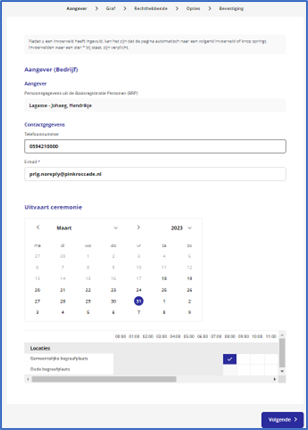
- Start, log in with e-recognition
- Declarant is shown on screen, as well as email(mandatory) and/or telephone number; otherwise, fill in
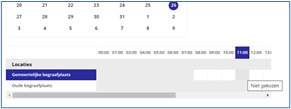
- Select funeral date
- Select the location and desired time
- (white boxes are available)
Grave
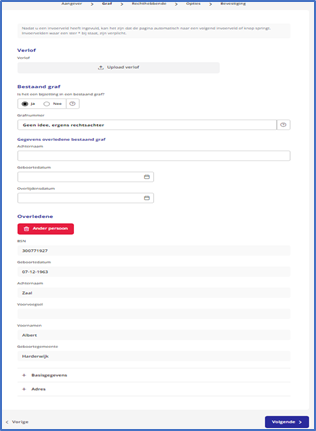
- If available, upload leave, not mandatory.
- Burial in an existing grave? Enter the grave number, surname, date of birth, and date of death. (No mandatory fields). Otherwise , indicate the grave number.
- If it is a new grave, indicate whattype of grave it should be( ). The cemetery, shown, has already been selected in the previous screen.
- Then enter the social security number, date of birth, and last name of the deceased.
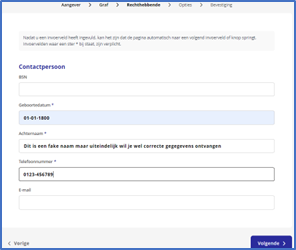
Entitled
- Fill in the contact person's details. Date of birth, last name, and phone number are required. The details will not be verified. Social security number and email address are not required but are desirable for keeping records.
- Do not enter the social security number/name of the funeral director here. If not yet known, you can also enter "Not yet known" or "To be confirmed" as the name, with a fictitious date.
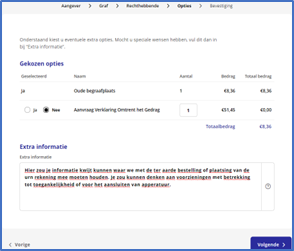
Options
- Here you can add additional information and matters that need to be taken into account for the funeral. You can check the options as applicable.
Confirmation
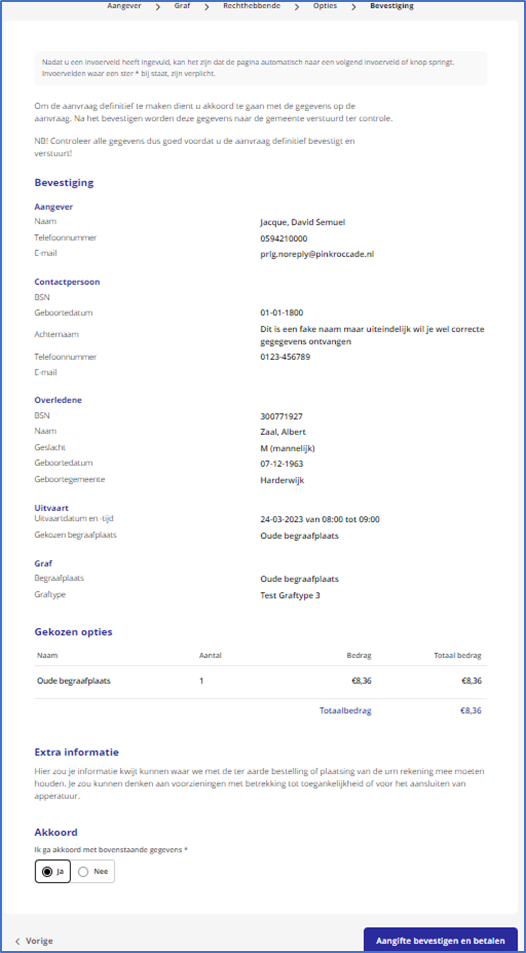
- Review all the information you have entered, check it, tick the box at the bottom to agree, and click on send.